Securing Apache Iceberg Tables with Fine-Grained Row and Column Level Access Control
Apache Iceberg handles table format, schema evolution, and metadata management. What it doesn’t handle is access control. The spec defines how data is structured and stored, not who can see which rows or whether a phone number column gets masked for certain users.
That gap isn’t a flaw : it’s a design choice. Security belongs in the catalog and query engine layer, not in the file format. But it means you need to understand which layer does which job before you assume your Iceberg tables are actually secured.
What Apache Iceberg Controls (and What It Doesn’t)
Iceberg manages everything about the physical table: file layout, schema history, partition structure, snapshot history, and encryption at rest (in v3). It does not control which users can read which rows, and it cannot mask column values based on user identity.
If you give a compute engine direct read access to the Parquet files in your S3 bucket, that engine reads all rows and all columns. The Iceberg metadata tells it where the files are; nothing in the spec prevents it from reading the full content.
Row-level security and column masking must be enforced at the catalog level, the engine level, or both. The catalog-level approach is more reliable because it applies consistently regardless of which engine connects. Engine-level policies work but are engine-specific : a policy you configure in Trino doesn’t automatically apply when the same table is queried through Spark.
Apache Polaris RBAC: The Catalog Layer Foundation
Apache Polaris provides role-based access control (RBAC) for Iceberg tables through a hierarchy of service principals, principal roles, and catalog roles. Service principals represent identities (users, applications, or engines). Principal roles group service principals. Catalog roles define what a group of principals can do with specific namespaces or tables.
The key security feature in Polaris is credential vending. When a compute engine requests access to an Iceberg table, Polaris doesn’t give it a long-lived storage key. Instead, it issues short-lived, scoped credentials that give the engine access only to the specific storage paths it’s authorized to read. The engine can’t access files outside those paths, even if it knows the bucket structure.
This means even if a compromised compute engine tries to scan your full S3 bucket, it gets credentials that only cover the paths Polaris has authorized. The storage policy is enforced at the catalog level, not just at the bucket IAM level.
What Polaris doesn’t do natively is row-level filtering or column masking. A catalog role either grants access to a table or it doesn’t. For finer-grained control : different rows visible to different roles, or SSN columns masked for analysts , you need the query engine layer.
Row-Level Security Through Query Engine Policies
Row-level security (RLS) filters rows at query time based on the user or role running the query. An analyst with a regional role sees only the rows for their region. A compliance officer sees all rows. The same table serves both.
Most Iceberg-compatible engines implement RLS through a policy layer that rewrites queries at execution time.
AWS Lake Formation integrates with Iceberg tables on S3 and supports cell-level security: filtering by row conditions and masking specific columns. It works at the storage access level, which means the policy applies regardless of whether the engine is Athena, EMR Spark, or Glue.
Dremio implements RLS and column masking through user-defined functions (UDFs) applied to virtual datasets. A virtual dataset (VDS) is a SQL view defined in Dremio’s semantic layer. You define the masking or filtering logic once in the VDS, and every query against that virtual dataset goes through the access control logic. Users querying through Dremio can’t bypass the VDS to reach the raw table unless they have direct table permissions.
The UDF-based approach in Dremio is flexible. You can write masking functions that partially expose data : showing the last four digits of a credit card number, or replacing an email domain with ***.*** , rather than fully hiding the column. The function gets the user’s role from the session context and applies the appropriate transformation.
-- Example Dremio column masking UDF
CREATE FUNCTION mask_email(email VARCHAR, user_role VARCHAR)
RETURNS VARCHAR
AS IF user_role IN ('admin', 'compliance') THEN email
   ELSE REGEXP_REPLACE(email, '@.*', '@[redacted]')
   END;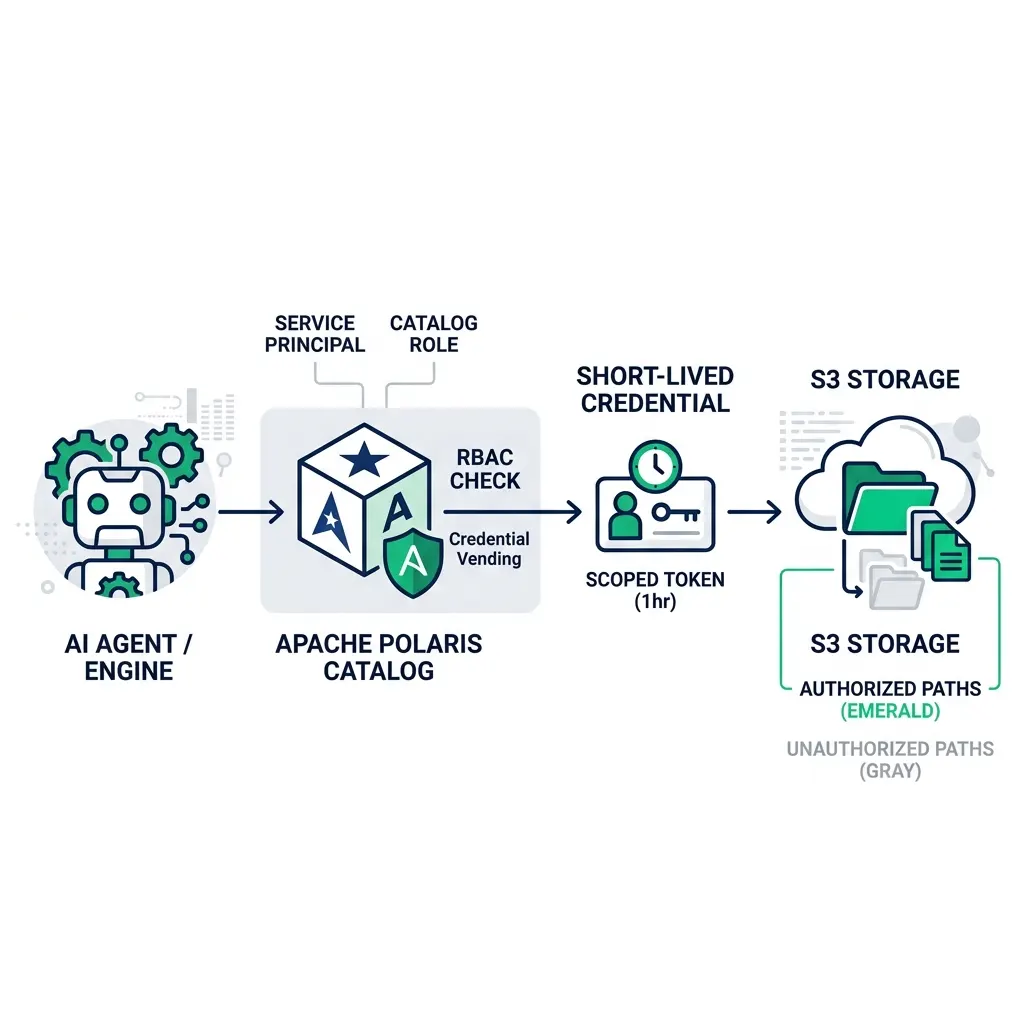
Column-Level Masking for PII Compliance
PII masking at the column level requires the engine to substitute values based on user identity before returning results. The mask applies transparently : the analyst runs a normal SELECT and gets masked values without needing to know the masking rule exists.
Effective PII masking in an Iceberg environment requires:
-
A catalog with column-level metadata that identifies which columns contain PII. Dremio’s semantic layer supports wiki annotations and labels on columns. You can label a column as
PII: Emailand use that metadata to drive masking policies programmatically. -
A consistent enforcement point that every user or application must pass through. If analysts can connect directly to the Iceberg catalog via Spark without going through Dremio, the Dremio masking policy doesn’t protect them.
-
An audit trail that records who accessed which columns and when. Compliance frameworks require demonstrating that PII was not accessed by unauthorized parties, not just that you had a masking policy in place.
Dremio’s fine-grained access control covers all three requirements through its Open Catalog. Tables cataloged in Dremio have column-level labels. Access through Dremio enforces the masking policy. Every query is logged with the user identity, query text, and accessed columns.
The Governance Stack in Practice
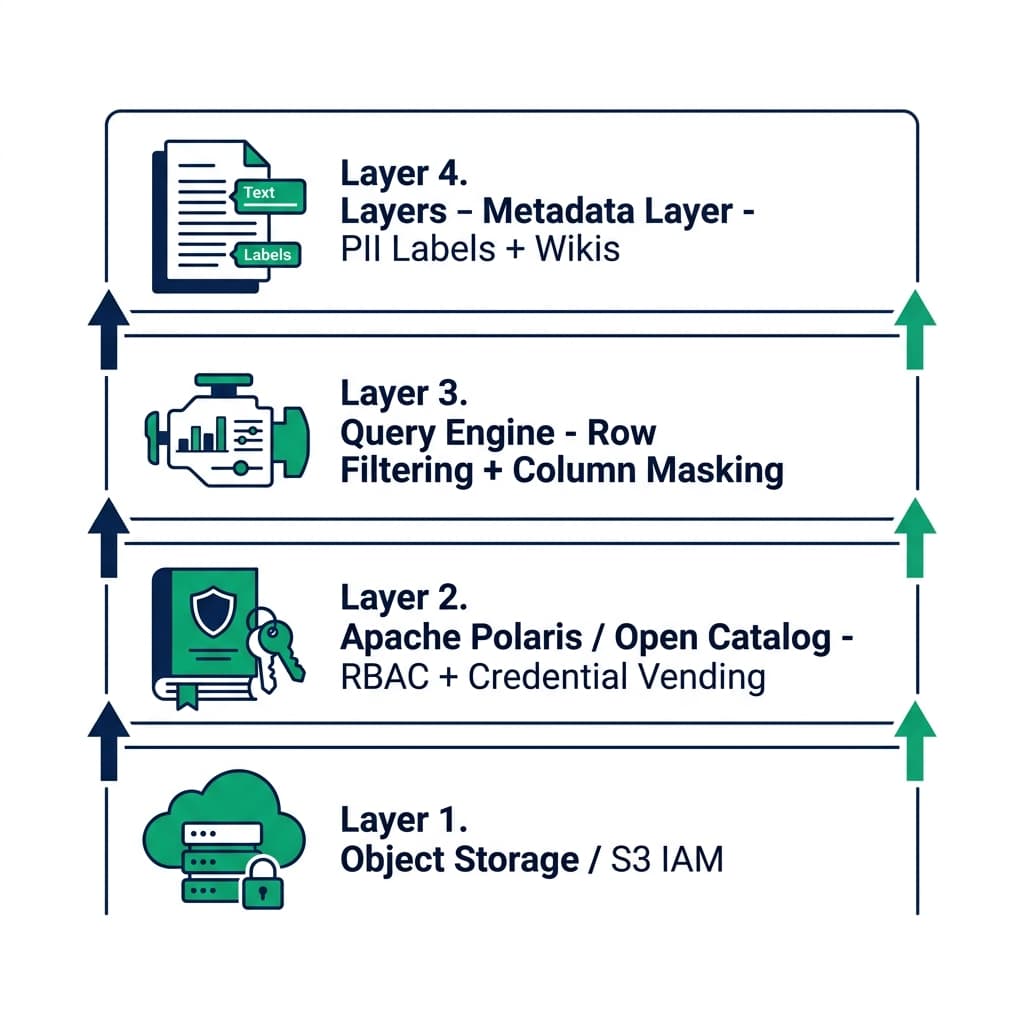
For most enterprise Iceberg deployments, the realistic access control stack looks like this:
| Layer | Tool | What It Controls |
|---|---|---|
| Storage | S3 IAM or Azure RBAC | Who can access the bucket at all |
| Catalog | Apache Polaris / Dremio Open Catalog | Which tables each engine can discover and access |
| Engine | Dremio VDS + UDFs | Row filtering and column masking per user role |
| Metadata | Dremio Wikis and Labels | PII classification and policy metadata |
The catalog layer enforces the coarse boundary. The engine layer enforces the fine-grained access. The metadata layer provides the classification that drives policies.
Start by centralizing access through a single query engine for internal users. Expose raw Iceberg files only to trusted, audited processes. Build the VDS masking layer for any table containing regulated data, and verify that the audit log captures every query before you call the governance model complete.
AI Agents and Access Control
AI agents querying your Iceberg tables are subject to the same access control requirements as human analysts : they need to be scoped to the data they’re authorized to see, and their queries need to appear in your audit log.
The critical question for any AI agent deployment: what identity does the agent run as? An agent that runs with admin-level credentials is a governance gap, not a governed tool. Give AI agents their own service principal in Polaris, assign that principal to a role with specific table permissions, and review what that role can access before deploying the agent to production.
Dremio’s MCP server issues queries on behalf of the connected agent using the session credentials the agent presents. An agent connected with an analyst-role PAT gets analyst-level access through the same masking policies that apply to human analysts. The agent literally cannot see more data than an analyst in the same role.
This is the architecture that makes AI-driven analytics safe for regulated data environments : not because the AI is inherently trustworthy, but because the access control system enforces the same policies regardless of whether the requester is human or automated.
Testing Your Access Control Setup
Access control policies need testing before production. The most common governance gap: a policy is configured but not actually enforced because the engine connects with a credential that bypasses the masking layer.
Test your setup with a low-privilege service account that should be masked from PII columns. Run a query that would normally return sensitive data. Verify the masking output is what you expect. Then test with a privileged account that should see unmasked data, and verify that works too.
For row-level filtering, test with two identities that should see different rows, and confirm neither identity sees rows from the other’s scope. Document the test results and keep them as evidence that the policy was verified before data went into production.
Try Dremio Cloud free for 30 days and explore the full governance stack for your Iceberg lakehouse.