Query Engine Optimization - Table of Contents
- How Query Engines Think: The Tradeoffs Behind Every Data System
- Row vs. Column: How Storage Layout Shapes Everything
- How Databases Organize Data on Disk: Pages, Blocks, and File Formats
- B-Trees, LSM Trees, and the Indexing Tradeoff Spectrum
- Inside the Query Optimizer: How Engines Pick a Plan
- Volcano, Vectorized, Compiled: How Engines Execute Your Query
- Buffer Pools, Caches, and the Memory Hierarchy
- Partitioning, Sharding, and Data Distribution Strategies
- Hash, Sort-Merge, Broadcast: How Distributed Joins Work
- Concurrency, Isolation, and MVCC: How Engines Handle Contention
This is Part 7 of a 10-part series on query engine design. Part 6 covered execution models. This article covers how engines manage their most precious resource: memory.
RAM is 1,000x faster than SSD and 100,000x faster than HDD. The difference between a query that hits cached data and one that reads from disk is the difference between sub-second and minutes. Every database engine invests heavily in keeping the right data in memory and handling the cases where data does not fit.
The Memory Hierarchy
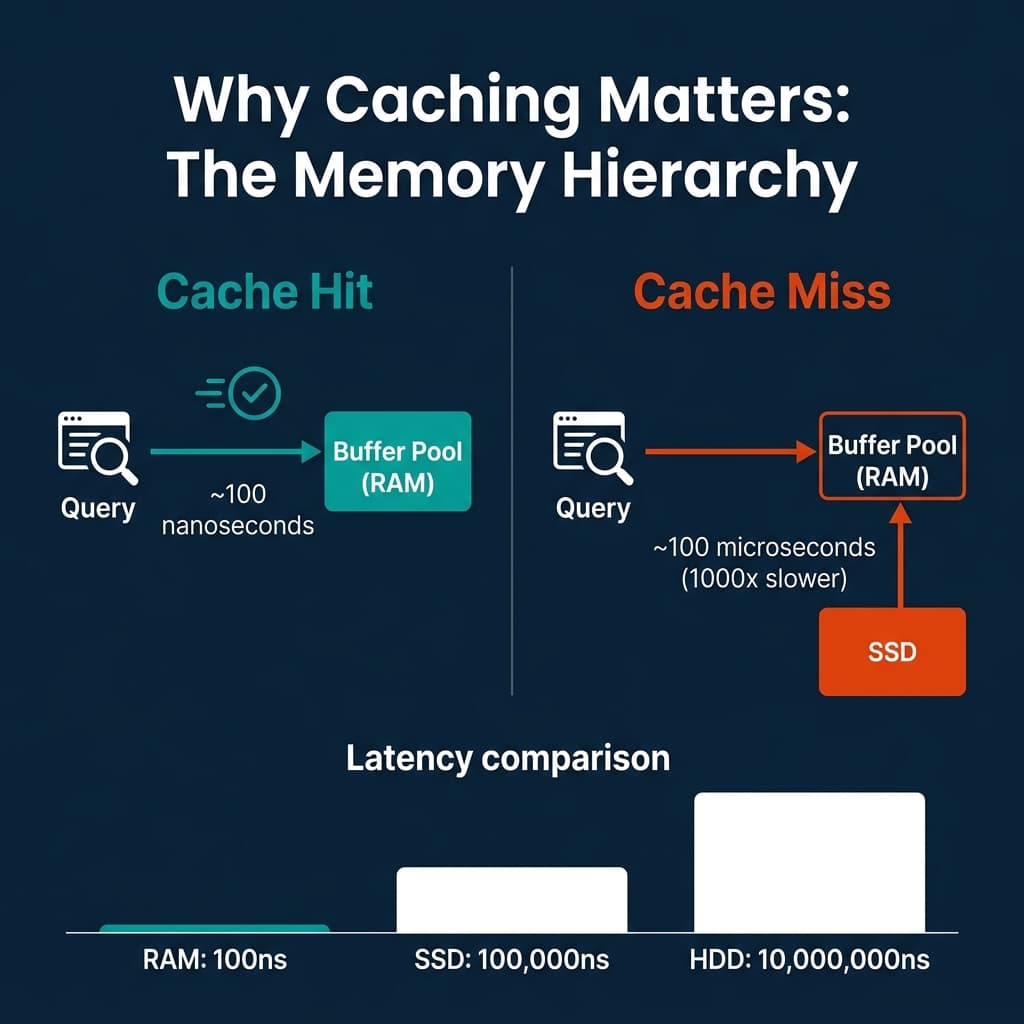
The latency gap between memory tiers is not linear. It is exponential:
| Storage Tier | Latency | Relative Speed |
|---|---|---|
| L1 CPU cache | ~1 ns | 1x |
| L3 CPU cache | ~10 ns | 10x slower |
| Main memory (RAM) | ~100 ns | 100x slower |
| NVMe SSD | ~100,000 ns (100 us) | 100,000x slower |
| HDD | ~10,000,000 ns (10 ms) | 10,000,000x slower |
This hierarchy is why caching strategies dominate database engineering. A well-tuned cache turns expensive disk reads into cheap memory lookups for the most frequently accessed data.
Buffer Pools: The OLTP Approach
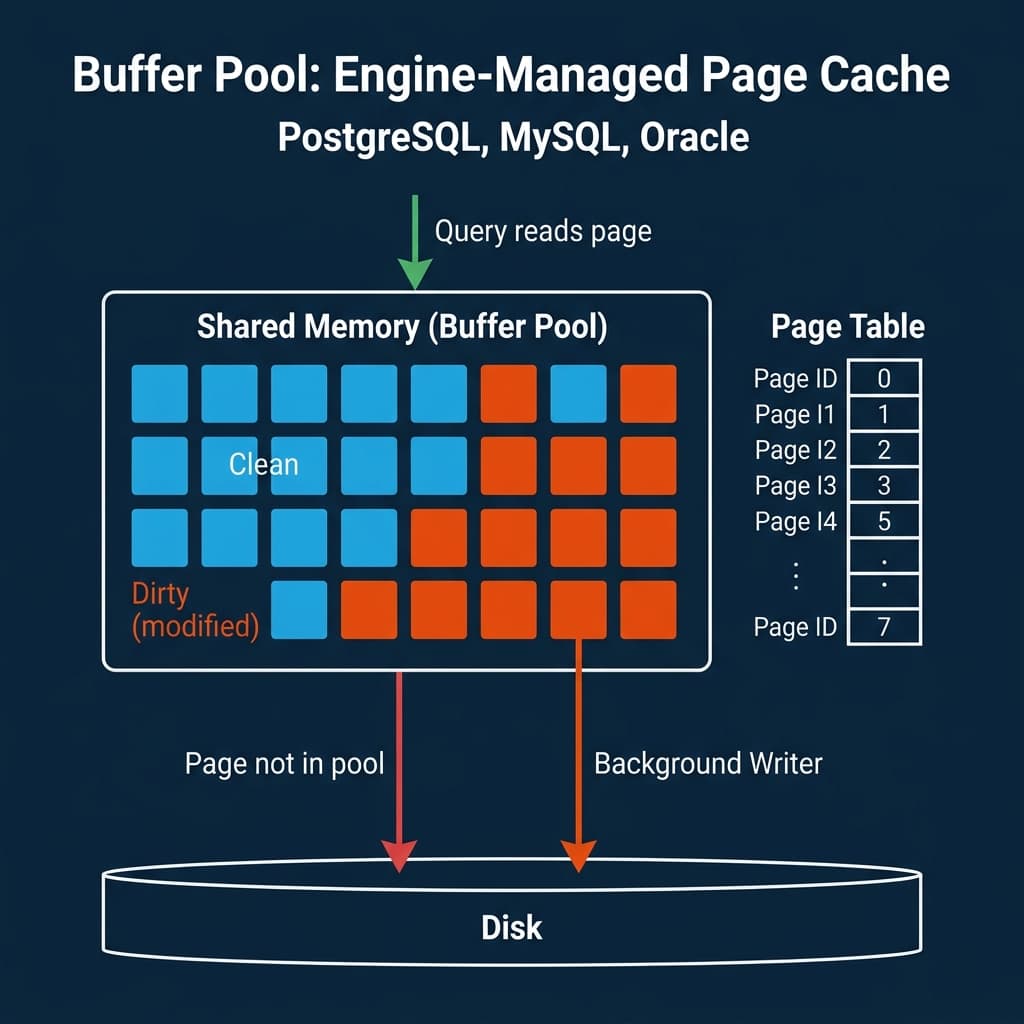
Traditional relational databases (PostgreSQL, MySQL/InnoDB, Oracle, SQL Server) use a buffer pool: a region of shared memory that holds copies of disk pages. When a query needs a page, the engine checks the buffer pool first. If the page is there (cache hit), it is returned immediately. If not (cache miss), the page is read from disk into the buffer pool, potentially evicting an older page.
Page Replacement Policies
When the buffer pool is full and a new page needs to be loaded, the engine must evict an existing page. The policy for choosing which page to evict has a significant impact on cache hit rates.
LRU (Least Recently Used) evicts the page that was accessed least recently. Simple but vulnerable to sequential scan pollution: a single full table scan loads every page into the pool, evicting frequently-used index pages. After the scan, the pool is full of pages that will never be accessed again.
Clock (used by PostgreSQL) is an approximation of LRU that avoids the overhead of maintaining a sorted access list. Each page has a reference bit. The clock hand sweeps through pages; if the bit is set, it clears it and moves on. If the bit is unset, the page is evicted.
LRU-K tracks the K-th most recent access time instead of just the most recent. A page accessed twice in the last minute ranks higher than a page accessed once a second ago. This resists sequential scan pollution because single-access pages never accumulate enough history to rank highly.
PostgreSQL’s shared_buffers parameter controls buffer pool size. MySQL’s innodb_buffer_pool_size does the same. Typical production settings allocate 25-50% of total system memory to the buffer pool.
Columnar and Result Caches: The OLAP Approach
Analytical engines take a different approach. Instead of caching arbitrary disk pages, they cache data at higher levels of abstraction.
Column caches store decoded, decompressed column data in memory in a format ready for vectorized processing. Dremio’s C3 (Columnar Cloud Cache) caches Parquet column data on local NVMe SSDs, avoiding repeated reads from cloud object storage (S3, ADLS, GCS). This is critical because cloud object storage latency is 10-100x higher than local SSD.
Result caches store the output of entire queries. If the same query runs again and the underlying data has not changed, the cached result is returned instantly without re-executing the query. Snowflake, BigQuery, and Dremio all use result caching. The challenge is cache invalidation: when the underlying data changes, all cached results that depend on it must be invalidated.
Materialized views / Reflections precompute and store the results of common query patterns. Dremio’s Reflections are a form of intelligent result caching: the engine automatically creates and maintains aggregation and raw Reflections based on query patterns, and the optimizer transparently routes queries to the appropriate Reflection when it matches. Unlike traditional result caches, Reflections persist across sessions and are automatically refreshed when source data changes.
The Memory Budget Tradeoff
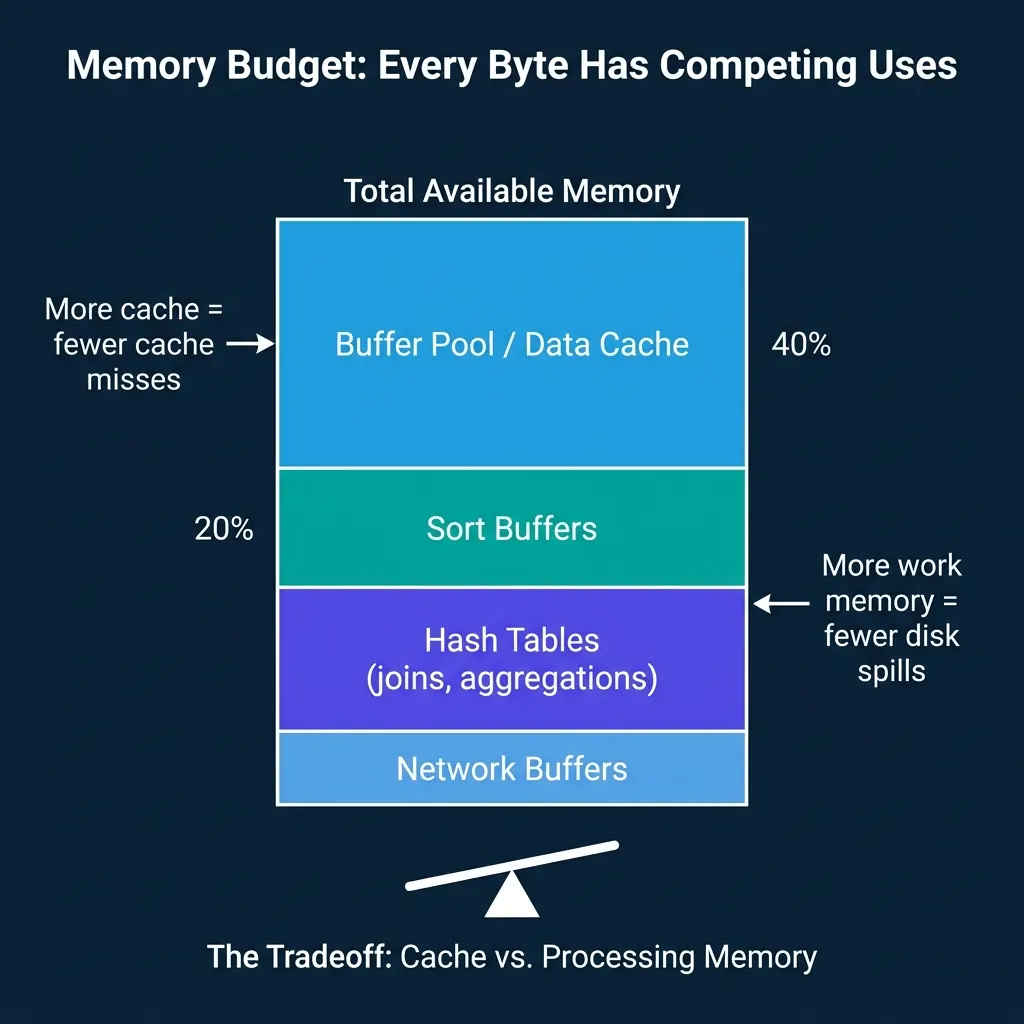
Every engine must divide its available memory among competing uses:
- Data cache (buffer pool, column cache): Reduces disk I/O by keeping hot data in memory.
- Sort buffers: Used by ORDER BY, MERGE JOIN, and index creation. Larger buffers mean fewer multi-pass external sorts.
- Hash tables: Used by hash joins and hash aggregations. If the hash table does not fit in memory, the engine must spill partitions to disk and process them in multiple passes.
- Network buffers: In distributed engines, memory is needed for sending and receiving data during shuffles and broadcasts.
The tradeoff is direct: every megabyte allocated to caching is a megabyte unavailable for processing. A large buffer pool reduces cache misses but may force hash joins to spill to disk. A large work memory allocation prevents spills but reduces cache hit rates.
PostgreSQL exposes this tradeoff through separate parameters: shared_buffers for the buffer pool and work_mem for per-operation sort/hash memory. Dremio and Snowflake manage this allocation automatically, adjusting the split based on workload characteristics.
Spill-to-Disk Strategies
When an operation exceeds its memory budget, the engine must “spill” intermediate data to disk and continue processing. This is slower than in-memory processing but prevents out-of-memory failures.
External sort: Divide the data into runs that each fit in memory. Sort each run. Write sorted runs to temporary files. Merge the runs using a k-way merge. For very large datasets, this may require multiple merge passes.
Grace hash join: When the hash table for a join does not fit in memory, partition both sides of the join by hash value and write partitions to disk. Then process each partition pair independently, where each partition’s hash table fits in memory.
Hybrid hash join: Keep as many partitions of the hash table in memory as possible. Only spill the partitions that do not fit. This reduces I/O compared to pure Grace hash join when the data is only slightly larger than memory.
All major engines support spill-to-disk: PostgreSQL, Spark, Dremio, DuckDB, Snowflake. The key difference is how gracefully performance degrades. Some engines experience a sharp cliff when spilling starts; others degrade gradually.
Where Real Systems Land
| System | Primary Cache | Eviction Policy | Spill Strategy | Cloud Cache |
|---|---|---|---|---|
| PostgreSQL | Buffer pool (pages) | Clock | External sort, hash spill | N/A |
| MySQL/InnoDB | Buffer pool (pages) | LRU with young/old sublists | External sort | N/A |
| DuckDB | OS page cache | OS-managed | External sort, hash spill | N/A |
| Snowflake | Result cache + local SSD | Automatic | Automatic spill | SSD cache for remote storage |
| Dremio | C3 columnar cache + result cache | Automatic | Hash spill, sort spill | NVMe SSD for S3/ADLS/GCS |
| Spark | Unified memory manager | LRU within pools | Spill to local disk | N/A (relies on cluster storage) |
| ClickHouse | OS page cache + marks cache | OS-managed | Partial sort spill | N/A |
The pattern: OLTP engines cache at the page level with explicit buffer pools. OLAP engines cache at higher levels (columns, results, materialized views) and rely on the OS or local SSDs for lower-level caching.
Memory management is rarely the most visible part of a database engine, but it is often the most impactful. The difference between a query that runs entirely in memory and one that spills to disk can be 10-100x in execution time.
Books to Go Deeper
- Architecting the Apache Iceberg Lakehouse by Alex Merced (Manning)
- Lakehouses with Apache Iceberg: Agentic Hands-on by Alex Merced
- Constructing Context: Semantics, Agents, and Embeddings by Alex Merced
- Apache Iceberg & Agentic AI: Connecting Structured Data by Alex Merced
- Open Source Lakehouse: Architecting Analytical Systems by Alex Merced